Single Motor vs Dual Motor Standing Desk
Quick answer
A single motor standing desk, commonly rated 150 to 220 lb and moving about 1.0 in/s, is the right buy for one monitor or a laptop under $150. A dual motor desk, commonly rated 250 to 355 lb and moving about 1.5 in/s, is the right buy once you add a second monitor, a monitor arm, or a heavier top, because it also stays level when that weight sits off center.
Researched from published manufacturer specifications, ANSI/BIFMA X5.5 test references, and verified owner reviews rather than in-person testing.
The options
- Single motor standing desk
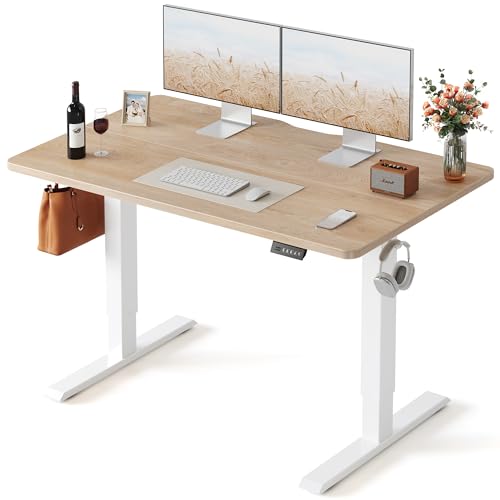
FEZIBO Standing Desk 48 × 24 Inch Electric Height Adjustable, Maple
A 48 x 24 in electric standing desk in a single motor frame class, commonly rated 150 to 220 lb and moving about 1.0 in/s, at $99.98.
$99.98 Check pricePrices change often - Dual motor standing desk
The FLEXISPOT E6 Dual Motor Standing Desk Frame, a 3-stage frame commonly rated 250 to 355 lb and moving about 1.5 in/s, at $171.46.
$171.46 Check pricePrices change often


Best for: A laptop or one monitor, a tight budget, and a desk under 50 in wide.
Avoid if: You plan to add a second monitor, a monitor arm, or a heavy solid wood top later.
Best for: Two or more monitors, a monitor arm, an uneven load, or a heavier desktop.
Avoid if: You only need to support a laptop and never plan to add weight off center.
| Specification | Single motor | Dual motor |
|---|---|---|
| Typical travel speed | About 1.0 in/s | About 1.5 in/s |
| Typical load class | 150 to 220 lb | 250 to 355 lb |
| Load-leveling under uneven weight | Can rack slightly off center | Stays level, both legs drive together |
| Duty cycle | Commonly 10 percent (2 min on, 18 min off) | Commonly 10 percent (2 min on, 18 min off) |
| Test standard | ANSI/BIFMA X5.5 | ANSI/BIFMA X5.5 |
| Price at review | $99.98 (FEZIBO 48x24) | $171.46 (FLEXISPOT E6) |
What a published lift capacity actually excludes
Every load rating you see on a standing desk listing, whether it is a single motor 150 to 220 lb class or a dual motor 250 to 355 lb class, describes what the frame can lift excluding the tabletop itself. The desktop is a separate line item, and desktops in this catalog run from about 33 lb for a laminate or MDF top up to 95 lb for a 72 x 30 in solid hardwood slab. That means a dual motor frame rated at 300 lb with a 95 lb hardwood top only has about 205 lb of remaining capacity for monitors, arms, a dock, and everything else on the surface.
This is the single most common miscalculation in a standing desk purchase. A buyer reads "300 lb capacity," mentally allocates all of it to monitors and gear, and is surprised when the desk struggles or triggers an overload warning with a heavy top installed. Before you compare motor classes, weigh or look up your desktop and subtract that number from the rated capacity first.
Why load-leveling matters more than raw speed
The half second difference between a 1.0 in/s single motor desk and a 1.5 in/s dual motor desk is not something most people notice in daily use; a full travel cycle from sitting to standing height takes roughly 10 to 15 seconds either way. The real functional difference is load-leveling. A dual motor frame drives both legs from independent motors that are synchronized, so the desktop stays level even when weight sits mostly on one side, such as a monitor arm holding two panels on the left edge or a PC tower mounted under one corner.
A single motor frame drives both legs from one motor through a crossbar or belt system, and under a significantly uneven load it can rack, meaning one side rises slightly ahead of the other before settling. At low weights this is imperceptible. Once you are running a heavy monitor arm, a CPU holder, and a desk lamp all on the same side, the imbalance becomes visible over a full height cycle and, over years, can add uneven stress to the frame's joints.
The duty cycle limit applies to both classes
Both single and dual motor frames in this comparison share the same duty cycle limitation, commonly about 10 percent, meaning roughly 2 minutes of continuous motor run time followed by an 18 minute cooldown before the next full cycle. This is not a speed difference between the two classes; it is a thermal limit on the motor windings that applies whether you have one motor or two. In practice this rarely matters because a sit-to-stand transition takes seconds, not minutes, but it is worth knowing if you plan to cycle the desk repeatedly and quickly, such as during a demo or in a shared space.
Matching the frame to what actually sits on the desk
A single monitor on a factory stand, a laptop, a keyboard and a mouse rarely exceeds 40 to 50 lb combined, well inside a single motor frame's 150 to 220 lb class even after accounting for a laminate top. That is the buyer this class is for, and paying more for a dual motor frame in that case buys headroom you are unlikely to use.
The math changes once you add a second or third monitor, a heavy-duty monitor arm rated for ultrawide panels, a CPU holder carrying a full tower, or a solid wood desktop. Stack those together and you can be within 50 to 100 lb of a single motor frame's rated ceiling before subtracting the desktop weight, which is the point where the dual motor class's higher ceiling and load-leveling both start to matter.
What the ANSI/BIFMA X5.5 test standard covers
ANSI/BIFMA X5.5 is the test standard most electric standing desks are rated against, covering structural durability, stability at full height, and repeated cycle testing to simulate years of raising and lowering the frame. A desk that passes this standard has been tested for mechanical reliability under its published load class, but the standard does not separately certify motor count; a single motor frame and a dual motor frame can both meet X5.5 while sitting in different load classes entirely.
What this means for a buyer is that X5.5 compliance tells you the frame will not fail structurally within its rated capacity, but it does not tell you whether that rated capacity, 150 to 220 lb for a typical single motor frame or 250 to 355 lb for a typical dual motor frame, is enough for your setup. You still have to do the desktop-weight subtraction yourself and compare the remaining capacity against what you actually plan to put on the desk.
Single motor standing desks
Shown across the range this category actually spans, from $99.98 to $679.99, rather than the cheapest few.
- FEZIBO
FEZIBO Standing Desk 48 × 24 Inch Electric Height Adjustable, Maple
$99.98 Check pricePrices change often - VIVO
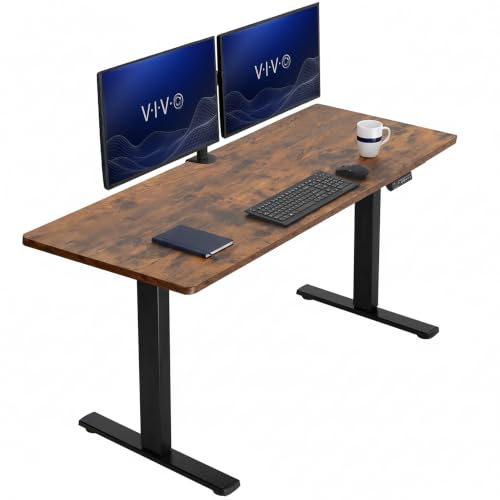
VIVO Rustic Vintage Brown 60 x 24 in Standing Desk, DESK-KIT-1B6N
$219.99 Check pricePrices change often

Dual motor standing desks
Shown across the range this category actually spans, from $99.98 to $679.99, rather than the cheapest few.
- FEZIBO
FEZIBO Standing Desk 48 × 24 Inch Electric Height Adjustable, Maple
$99.98 Check pricePrices change often - VIVO
VIVO Rustic Vintage Brown 60 x 24 in Standing Desk, DESK-KIT-1B6N
$219.99 Check pricePrices change often
Get the desk setup checklist
One page: the measurements to take, the order to set them in, and the numbers to check against. Free, no spam.
The mailing list opens shortly. Every measurement it covers is already on this site, in the calculators and the fit tables, at no cost and with no address required.
Questions people ask
Is a dual motor standing desk actually worth the extra cost?
It depends on what sits on top. For a laptop or single monitor, a single motor frame in the 150 to 220 lb class is plenty and the extra cost of a dual motor frame buys headroom you will not use. Once you run two monitors, a monitor arm, or a heavier desktop, the dual motor class's higher rated capacity and load-leveling under uneven weight become real, not theoretical, advantages.
Does a single motor desk really rack or tilt under load?
Under light, centered loads no. Under a heavy load concentrated on one side, such as a monitor arm holding two panels on one edge, a single motor frame can rise slightly unevenly during a height change before settling level. It is not a safety failure, but it is a visible wobble that a dual motor frame's independently driven legs avoid.
How much of the rated lift capacity does my desktop use?
A laminate or MDF top runs about 33 lb, while a solid hardwood top at 72 x 30 in can run up to 95 lb. Subtract your desktop's actual weight from the frame's published rating to see what capacity remains for monitors, arms, and accessories, since every published rating excludes the tabletop by default.
What does the 10 percent duty cycle mean for daily use?
It means the motor is designed for roughly 2 minutes of continuous run time followed by an 18 minute rest, a limit shared by both single and dual motor frames. A normal sit to stand transition takes seconds, so this limit almost never affects a single user cycling the desk a handful of times a day.
Is 1.5 in/s noticeably faster than 1.0 in/s in real use?
Barely. Over a typical 20 to 24 in height range, the difference between the two speeds works out to only a few seconds per full cycle, which is not something most people register while waiting for a desk to finish moving. Most owners notice the load class and load-leveling stability differences between single and dual motor frames far more than the raw speed difference during a normal sit to stand transition.
Can I put a monitor arm on a single motor desk?
Yes, as long as the combined weight of the arm, monitors, and everything else on the surface stays comfortably under the frame's rated capacity after subtracting the desktop weight. A single arm holding one monitor is usually fine; a heavy-duty arm holding two large or ultrawide panels on one side is where a dual motor frame's load-leveling starts to matter.