Best L-Shaped Standing Desks
Quick answer
The VIVO 63x55 Corner Standing Desk ($259.99) is the best L-shaped standing desk for most home offices, pairing a well documented brand with a 63x55 inch corner footprint that fits a dual monitor and a side work zone. The Huuger 63x55 with power outlets ($189.98) is the budget entry into the same layout.
Picks are researched from published manufacturer specifications and verified owner reviews. We did not test these desks in person.
An L-shaped standing desk uses a corner layout to fit two work zones, such as a monitor setup and a separate writing or laptop area, into the same footprint a straight desk would use for one. Our pick, the VIVO 63x55 Corner Standing Desk at $259.99, gives you that layout from a brand with a long track record in the standing desk market, at a price between the budget Huuger frame and the pricier SIAGO option.
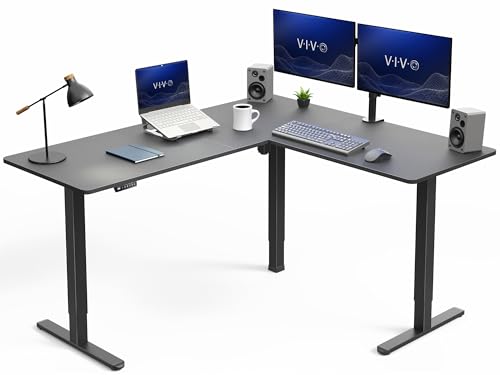
VIVO Black 63 x 55 in Corner Standing Desk, DESK-E3CTB
A 63x55 inch corner layout from a well established standing desk brand, sized for a monitor zone and a separate work area without eating an entire wall.
The three tiers
Huuger 63 x 55 Inch L Shaped Standing Desk with Power Outlets
The Huuger 63 x 55 Inch L Shaped Standing Desk at $189.98 includes built-in power outlets, useful for keeping chargers and a monitor power brick off a separate power strip.
The trade off: It is the least documented brand of the three here, so lean more heavily on recent owner reviews before buying.
- Starter
Huuger 63 x 55 Inch L Shaped Standing Desk with Power Outlets
$189.98 Check pricePrices change often

VIVO Black 63 x 55 in Corner Standing Desk, DESK-E3CTB
The VIVO DESK-E3CTB at $259.99 comes from a brand with a wide catalog of standing desks and converters, which tends to mean more owner reviews to check against.
The trade off: It costs more than the Huuger for a similar overall footprint, and VIVO does not build in power outlets on this model the way the Huuger does.
- Buy once
VIVO Black 63 x 55 in Corner Standing Desk, DESK-E3CTB
$259.99 Check pricePrices change often
SIAGO L-Shaped Standing Desk - 63 x 55 Inch Adjustable Corner Standing Desk with Charging Station - L Shape Sit Stand Table with Memory Controller, Splice Board for Home Office
The SIAGO L-Shaped Standing Desk at $279.99 adds a built-in charging station and a splice board detail on the corner join, the most feature-dense option of the three.
The trade off: The added charging hardware and splice board are extra parts that can be more to service if something fails, and the price premium over the VIVO is modest for the added features.
Who should not buy it: Buyers who want the simplest possible L-shaped frame with the fewest built-in electronics.

How we chose
We did not test these desks in person. Every claim here comes from the manufacturer specification sheet and a reading of verified owner reviews, with extra attention to the corner joint, since that is the structural point unique to an L-shaped frame and the one straight desk reviews cannot tell you anything about.
We looked specifically at how each maker documents load capacity across the corner section, not just the two straight runs, since a corner desk's weakest point is often the joint rather than either leg. Where a spec was not published, we described the general class rather than inventing a figure.
What is the difference between an L-shaped desk and a straight desk with two legs?
An L-shaped standing desk has a corner section joining two straight runs into a single height adjustable top, usually supported by three legs total: one at each outer end and one at or near the corner. That corner support is what lets the desk cover two walls of a room without a seam that flexes independently.
A straight desk with a wide top, even a large one, only ever covers one wall. If your room has a corner you want to use, an L-shaped desk uses that space more efficiently than pushing a long straight desk against a single wall and leaving the corner empty.
| Desk | Size | Notable feature | Price |
|---|---|---|---|
| Huuger 63x55 | 63x55 in | Built-in power outlets | $189.98 |
| VIVO DESK-E3CTB | 63x55 in | Established brand catalog | $259.99 |
| SIAGO L-Shaped | 63x55 in | Charging station, splice board | $279.99 |
Does an L-shaped desk raise and lower evenly across both sides?
That depends on the frame's motor configuration and the corner support design, which is exactly why we weighted owner reviews heavily for this roundup. A well engineered corner desk keeps both runs level as it moves, while a weaker design can show a slight lag or lean at the corner during a raise or lower cycle.
Dual motor frames, common on L-shaped desks in this price range, are built to keep a load level even when it sits off center, which describes almost any L-shaped desk's natural load pattern once you put a monitor at one end and a laptop at the other.
How much floor space does a 63x55 inch L-shaped desk need?
A 63x55 inch footprint needs roughly that much wall length on each of two adjoining walls, plus clearance behind the desk to sit and stand comfortably, typically another 30 to 36 inches of room depth in front of the desk. Measure your corner before ordering, including any baseboard heater, outlet plate, or window trim that could interfere with the frame's legs.
If your room cannot fit a full 63x55 inch corner, a straight standing desk from our large standing desk roundup may fit the same wall length in a simpler single-run layout.
What weight capacity should I expect from an L-shaped frame?
Published lift capacity is measured above the frame and excludes the tabletop, and L-shaped tops run heavier than a comparable straight top because there is simply more surface area. Subtract the tabletop's weight, then account for a monitor at one end and different equipment at the other, since an L-shaped desk's load is naturally split rather than centered.
Dual motor frames commonly reach the 250 to 355 lb class and are the more common configuration on L-shaped desks in this price range, since they hold level under the naturally uneven load a corner layout creates.
Is a built-in power outlet or charging station worth paying for?
A built-in power outlet or USB charging station on the desk itself keeps cables shorter and reduces the number of things routed to a separate power strip on the floor, which matters more on a corner desk where two work zones both need power. The Huuger and SIAGO options here include this; the VIVO does not on this specific model.
If you already have a good cable management setup, such as a cable tray, this feature is a convenience rather than a necessity, and it is one more electrical component that could need servicing later.
Should the corner face the room or the wall?
Most L-shaped desks are built so the open side of the L faces into the room, with the two straight runs against adjoining walls, which keeps cables and the back of monitor stands hidden from view. Some buyers instead position the desk with the corner pointed into the room for a more open feel, though that placement works better in a larger space where the desk is not the only furniture against the walls.
Before deciding, walk through how you will actually sit and reach both runs of the desk. A corner facing away from the door can also affect how much natural light reaches your monitors, which is worth checking against your room's window placement.
Shop L-shaped standing desks
Shown across the range this category actually spans, from $189.98 to $279.99, rather than the cheapest few.
- Huuger
Huuger 63 x 55 Inch L Shaped Standing Desk with Power Outlets
$189.98 Check pricePrices change often
Cable management for a corner desk
Shown across the range this category actually spans, from $13.99 to $39.99, rather than the cheapest few.
- LOVJOYSE
Cable Management, 25.3'' Under Desk Cable Management Tray No Drill
$23.99 Check pricePrices change often - Univivi
Univivi No Drill Under Desk Cable Management Tray, 36 inch Cable Management
$39.99 Check pricePrices change often


Buying tips
- Measure both walls of your corner, plus clearance in front of the desk, before ordering an L-shaped frame.
- Check whether the corner section has its own dedicated support leg, since that joint is the structural point unique to this desk shape.
- Plan your monitor and equipment placement across both runs before buying, since the load on an L-shaped desk is naturally split rather than centered.
- If you want built-in power at the desk, confirm the specific model includes it, since not every L-shaped desk in the same size class does.
Get the desk setup checklist
One page: the measurements to take, the order to set them in, and the numbers to check against. Free, no spam.
The mailing list opens shortly. Every measurement it covers is already on this site, in the calculators and the fit tables, at no cost and with no address required.
Questions people ask
Do all L-shaped standing desks come in the same size?
No, but 63x55 inches is a common size in this category, including all three desks in this roundup. Larger and smaller L-shaped frames exist elsewhere in the market, so measure your corner first and treat 63x55 as a common reference point rather than a fixed standard, since a room with a shallower or deeper corner may need a different footprint entirely to fit properly.
Can I remove the corner section later if I move to a different room?
Most L-shaped desks are not designed to be reconfigured into a straight desk, since the corner section is typically a separate fitted piece rather than a removable extension. If you expect to move to a room without a usable corner, a straight standing desk may be the more flexible long term choice.
Is an L-shaped desk harder to assemble than a straight one?
Generally yes, since there are more panels, more legs, and a corner joint to align correctly, compared with a two-leg straight desk. Budget extra assembly time, and check owner reviews for complaints about the corner bracket or splice board fit, which is the step most commonly flagged as fiddly, and consider having a second person help align the corner section before tightening the final bolts.
Does an L-shaped desk need a bigger anti-fatigue mat?
It depends on how much you move between the two work zones. If you shift from the monitor side to the laptop side of the corner during the day, a wider mat, or two separate mats, covers more of your actual standing area than a single mat sized for a straight desk's center.
Are L-shaped standing desks more expensive than straight ones of similar size?
Generally yes, since an L-shaped frame needs a third leg, a corner support, and a larger cut of tabletop material than a straight desk covering similar wall length. The three desks in this roundup range from $189.98 to $279.99, roughly in line with mid-range straight desks of comparable width, though you are getting two usable work zones rather than one long straight run for that price.
What is a splice board on an L-shaped desk?
A splice board is the piece that joins the two straight runs of the desktop at the corner, and its fit quality affects both the look of the seam and how solid the corner feels under load. The SIAGO model in this roundup calls out its splice board specifically, and it is a detail worth checking in photos and owner reviews on any L-shaped desk you consider.